
Dashboards#
Dashboards keep useful trackers that can also appear in an agent's conversation. They are off by default. Enable Settings → Appearance → Dashboards, then open an agent and choose Dashboard in its header. Conversation and Dashboard tabs keep both views within the same agent. On desktop, the existing conversation sits beside the dashboard. Drag the divider to resize chat, or use Hide chat / Show chat. The divider also supports arrow keys, Home, and End. On smaller screens, choose Chat to open it and Close chat to return to the widgets. Each agent has its own dashboard. The setting is saved on the Roost server and applies to every device. Turning it off hides the page's content and prevents dashboard reads and updates; existing widgets remain saved for when you enable it again.
Add an interactive tracker#
Use Add tracker to create a to-do list, calorie log, or weather card. Tasks can be added, completed, reopened and removed. Meal entries accept a label, date and explicit calorie count, with a total for the selected day. These controls save directly to Roost and work in the native iPhone app too. They do not estimate nutrition values or create a calorie target. Existing drafts survive conflicts; retries do not silently duplicate additions.
For live weather, search for a city, select the matching location, and choose °C or °F. The card shows current conditions and a five-day forecast from Open-Meteo. It includes the city, update time, attribution, and a Refresh control. Forecasts are cached for 15 minutes; a provider outage clearly labels any older saved forecast. Weather works in Summary and directly in chat too.
Use a tracker in chat#
Ask “Show my to-do list here” or “Create a meal log in this chat” to use a tracker directly in the conversation. The agent saves it, then shows an inline view with working controls on web and iPhone. Chat and Dashboard share the same saved data. Reopened messages show current contents rather than a historical snapshot. Editing a tracker never sends a chat message. Reply threads support the same controls, and closing a reply panel preserves unfinished tracker entries. If a tracker is removed or dashboards are turned off, its chat reference shows an unavailable message.
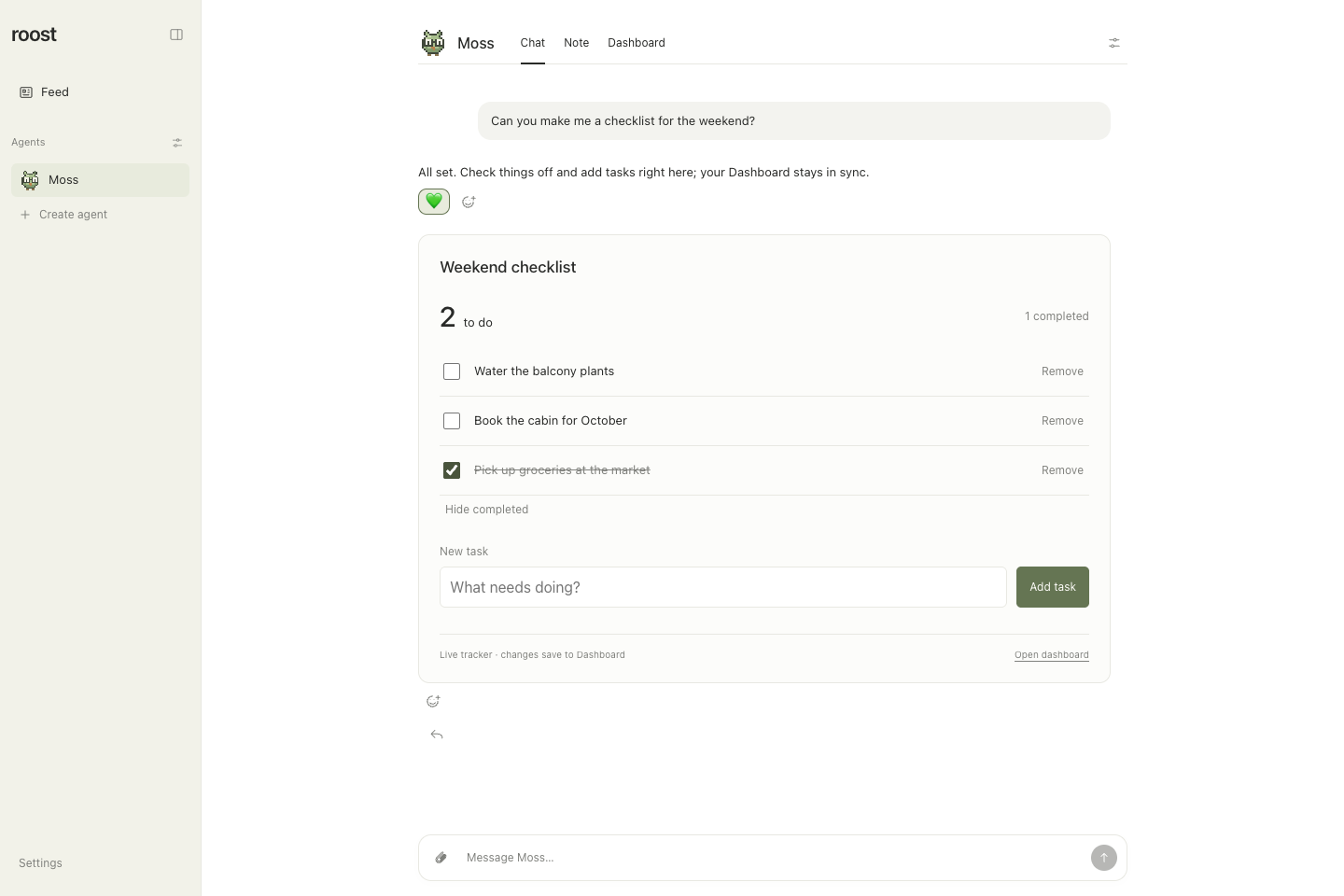
Update the saved tracker directly in chat. Real Roost interface with fictional sample data. Select the image for full size.
Focus your dashboard#
Choose View to show Everything, Summary, Charts, Tables, or Tasks. Only views with current content are offered. Reset view shows the complete dashboard. The selected view is saved on the server and shared with the native iPhone app.
When the server has a TypeSafe planner credential, Describe a view can focus an existing tracker by topic: try “Show my garden progress” or “Show the launch checklist.” Roost uses Juxi to select an authored view of your current widgets; it does not rewrite their data. Manual views work without a planner credential. See adaptive views and trackers for setup and the shared web/native contract.
Ask your agent to maintain a tracker#
Talk to an agent about what you want to track and which information will be useful. For example:
- “Show a weather card for Portland, Oregon in this chat.”
- “Build a project dashboard with current status, next steps, and a weekly trend.”
- “Keep a tracker of the cars we're comparing, including price, mileage, and source links.”
- “Track my spending this month with category totals and a chart. Tell me which data you need.”
Each named widget can combine notes, metrics, tables, line or bar charts, source links, and task lists. Charts include a View values option. The page shows each widget's last saved update time; use Discuss with… to focus the conversation and ask that agent to change or remove it. The agent reads existing widgets before updating them, so concurrent changes cannot silently overwrite one another.
Most widgets are saved reports. Their information changes when an agent checks a source and saves an update. Weather cards fetch forecasts through Roost automatically while visible and when you use Refresh. Ask for an automation if a tracker should refresh on a schedule, and choose whether routine updates should generate a conversation message. An automation can update the widget without posting every change in the conversation. The open Dashboard page checks for saved updates every 15 seconds while visible. If a refresh fails, it keeps the last loaded content and displays a notice.
Each agent can read and update only its own widgets; its Dashboard page shows only those widgets. Agents cannot enable dashboards themselves. Dashboard updates do not grant permission to access a new account or take an external action. Native blocks render as ordinary Roost UI; executable HTML and scripts are not supported. Each agent can keep up to 30 widgets, with up to 12 blocks per widget.
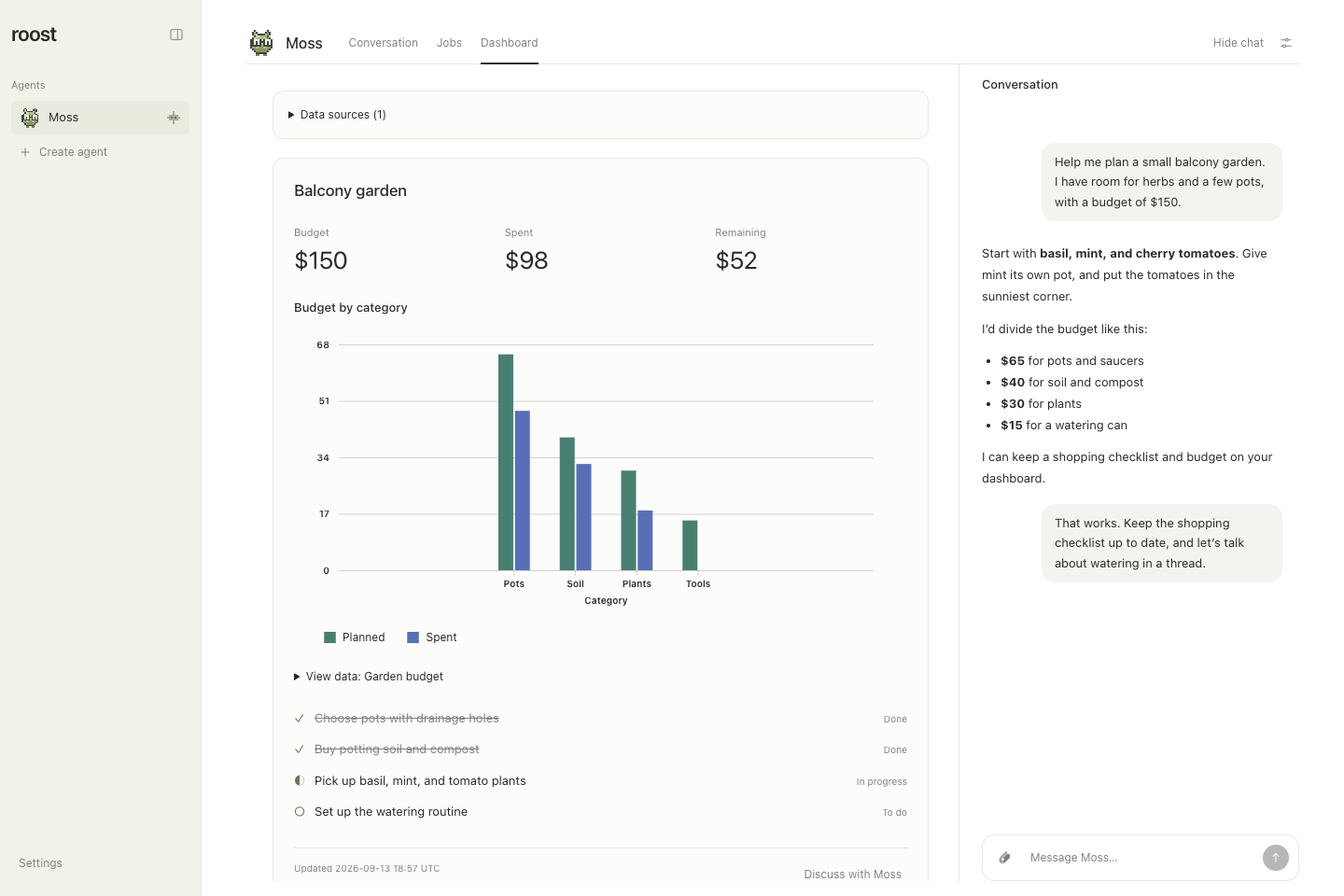
A saved dataset powers the category chart; chat stays beside the tracker. Real Roost interface with fictional sample data. Select the image for full size.
Charts and saved data sources#
Ask your agent to save a reusable data source, then build charts from it. For example: “Save our weekly delivery numbers, show completed versus planned work as grouped bars, and show each week's share as a donut.” Open Data sources on the Dashboard to inspect every saved dataset, including ones that no chart uses yet. View data under each chart shows the complete typed table, revision, last update time, description, and source link when supplied. Missing cells are displayed as “Missing”; they are never silently plotted as zero.
New dataset charts support:
| Style | Use |
|---|---|
line | One to four trends |
bar | Grouped comparisons, including signed values |
stacked-bar | Nonnegative contributions by category |
area | Nonnegative stacked trends |
donut | One series, up to 24 categories, with a positive total |
scatter | Numeric x/y relationships, up to four series |
Data sources are saved snapshots, not external/live connectors. Updating a source updates all its referencing charts on the next dashboard refresh. Widget and source revision/update times are separate. Nothing enables dashboards or schedules a refresh job automatically. Existing inline line/bar blocks and their View values control remain unchanged.
Each agent may save 30 sources. A source has up to 8 uniquely keyed columns,
200 rows, and 64 KB of serialized content. Columns are string, number, or
boolean; each row has exactly one correctly typed cell (or null) per column.
Numbers must be finite and between −10¹⁵ and 10¹⁵. Chart series reference numeric
columns. Selected chart columns must have no missing values. Bars and donuts
require unique category labels; aggregate duplicate categories first. Empty
sources are valid and display an empty state.
Line/area charts use row order for categorical labels and ascending x order for numeric columns. Scatter always uses numeric x. No automatic aggregation, date parsing, or interpolation of missing data occurs. Series labels must be unique. Long/dense axes may show fewer or truncated labels; the data table retains every full label and value. Legends and tooltips supplement the accessible table.
Agent tool example#
Call roost_save_dataset (omit expectedRevision only for a new source):
{
  "key": "weekly-delivery",
  "title": "Weekly delivery",
  "description": "Manually collected project totals for September.",
  "columns": [
    { "key": "week", "label": "Week", "type": "string" },
    { "key": "done", "label": "Completed", "type": "number" },
    { "key": "planned", "label": "Planned", "type": "number" }
  ],
  "rows": [["Week 1", 6, 8], ["Week 2", 9, 11]]
}
Then use this block in roost_save_dashboard:
{
  "type": "dataset-chart",
  "title": "Completed versus planned",
  "datasetKey": "weekly-delivery",
  "style": "bar",
  "x": "week",
  "series": [
    { "column": "done", "label": "Completed" },
    { "column": "planned", "label": "Planned" }
  ]
}
roost_list_datasets returns saved sources and revisions. To replace a source,
pass its current expectedRevision to roost_save_dataset. Breaking an existing
chart's column/value requirements is rejected atomically; adjust its widgets
first. roost_delete_dataset requires the user's request, the current revision,
and removal of all chart references. All three tools derive ownership from the
executing agent, accept no target agent, honor maintenance and the dashboard
setting, and are unavailable to reflections. Authorized background runs can
update datasets just as they can update widgets.
Implementation and compatibility#
Research checked 2026-09-08 against Microsoft's charting guide,
Fluent repository, and published package
metadata (pnpm view @fluentui/react-charts version peerDependencies --json and
its react-charting equivalent). “flintjs charts from MS” is interpreted as Fluent
UI Charts. Both published versions checked support React 19: v9 react-charts
9.3.25 declares React/React DOM >=16.14.0 <20.0.0; v8 react-charting 5.25.11
uses >=16.8.0 <20.0.0 and additionally requires Fluent React v8. The older
React 19 support issue
concerns 9.2.4 and is not the current package contract.
We pin @fluentui/react-charts 9.3.25, with the v9 provider/theme, and map our
bounded schema into its typed chart APIs. We do not accept arbitrary Fluent
props, callbacks, executable specifications, or URLs to fetch data. This retains
Roost's native-block safety model. The published package imports
@fluentui/react-menu and @fluentui/tokens without declaring them; a narrowly
scoped pnpm packageExtensions entry supplies those dependencies. No React peer
checks are disabled. Reassess this extension when upgrading Fluent.
Fluent is loaded in a separate lazy chunk only after the client has measured the
chart container. Server HTML and the first hydration render share the same
placeholder and semantic data table, avoiding chart DOM measurement during SSR.
ResizeObserver tracks the widget width (including the chat divider), and the
Fluent provider follows the current Roost palette and appearance, including
unsaved previews. Explicit Light/Dark overrides the device; System tracks it. A chart error boundary
keeps its saved table available if rendering fails. Missing source/column or
invalid selected values produce a recoverable message rather than a misleading
plot. The library adds roughly 160 KB gzip in its lazy client chunk; the build
reports its existing 500 KB uncompressed chunk-size warning threshold.
SQLite migration 10 reconciles the dataset and automation-model feature previews that both used schema 9, preserving boards, data sources, models, and settings. Dynamic tool version 12 ensures existing agent threads discover the new tools through Roost's existing migration mechanism.
Verification#
pnpm test covers dataset validation, caps, ownership, revisions, reference
integrity, maintenance/disabled gates, agent dispatch, migration, and legacy
boards. The original disposable production browser helper is available in the
review revision,
with its dedicated tooling removed from the release. Browser verification uses
isolated temporary storage and checks all six charts, legacy blocks, empty/missing
source recovery, keyboard tables, source inspection, legends, appearance,
resizing, and refreshed values.
See screenshot evidence for the paired review captures.