iPhone and mobile web#
Use Roost from the native iPhone app or your phone's browser. Both connect to the same server, agents, Feed, notes, and trackers. Agents keep working when you close either client, while Roost and its host remain running.
Native iPhone app#
The SwiftUI app lives in apps/ios and requires iOS 17 or later. Build it with
Xcode 16 or later; physical-device installation needs Apple signing. Follow the
native setup guide
for the project, signing, and device-token setup. TestFlight/App Store distribution
and native push notifications require separate Apple configuration.
On the server, create a token for this device:
roost mobile create --name iPhone --output ~/iphone-token.txt
Enter the server's HTTPS origin and that token in the app. The token is written once to an owner-readable file; transfer it privately and remove the transfer file after connecting. The app stores the connection in the iOS Keychain. It needs a directly reachable mobile API: an interactive browser-login proxy does not pass its cookies to the native app. The setup guide explains this boundary.
Move between your agent's work#
Use the bottom bar for Chat, Dashboard, Notes, and Coding for a coding agent. Each section keeps its own navigation history. More → Computer opens the shared desktop. The bar makes room for the keyboard while composing.
- Swipe right on an assistant message to open a focused reply thread, or use its context menu. Main conversations and reply threads keep separate drafts.
- Attach photos or files, inspect image previews, and open attachments with Quick Look. You can send an attachment without adding text.
- Edit trackers, check weather, and inspect native charts in Dashboard or directly in chat. The selected dashboard view is shared with web.
- Open Feed beside Agents to read and save the same personalized stories.
- Open Settings → Payments or the conversation's Payments control to review Link purchases and continue approval in Link.
Keep a draft through connection recovery#
Unsent drafts and pending sends recover after the app closes. Retrying an uncertain send uses its original message ID and payload, preventing duplicate turns. A confirmed rejected send returns to an editable draft.
Use Settings → Replace device token to renew an expired token and keep drafts for the same server. Disconnect this iPhone revokes the token and clears local drafts. Reopening the app refreshes saved server state; conversation history and actions still require a connection.
Home-screen web app#
Open your Roost HTTPS address in Safari, then choose Share → Add to Home Screen and open it as a web app. Roost provides a standalone manifest, app icons, and an Apple touch icon. The page and browser chrome follow your saved theme and appearance; System follows the device's light/dark appearance. The installed iOS status bar overlays a safe-area-padded header.
Mobile headers use an opaque background and position: sticky; top: 0 while
remaining in the layout. This gives WebKit a small, independently detected top
bar whose color can extend into the status-bar area, instead of depending on the
full-height app shell for scroll-edge rendering. It targets the iOS 27 blur that
can cover the menu and title. Safe-area padding, viewport height, and keyboard
handling remain unchanged. See WebKit's fixed-edge detection change.
Desktop browser checks can verify geometry and navigation, but this OS-rendered
effect still needs confirmation in an installed app on the affected iOS version.
Startup at / reopens the last agent visited in this browser or home-screen app.
The choice is stored locally on the device. If the agent is missing, storage is
unavailable, or no agent has been visited yet, startup shows the agent list.
Direct links keep their destination. Tap roost in navigation to open the list
without being redirected; an empty workspace offers Create an agent.
Swipe right across the page to open the agent picker, or tap the menu button. Use a short, mostly horizontal swipe outside text inputs, controls, and horizontally scrolling content such as code blocks and tables. Swipe left across the drawer to dismiss it, including across an agent row. You can also select an agent, tap outside the drawer, or use its close button.
On phones, the document stays fixed while the conversation or settings content
scrolls inside it. While the keyboard is closed, browser tabs use the dynamic
viewport (100dvh), while installed standalone apps use the full viewport
(100vh) for both the document and app shell. iOS can underreport dynamic and
percentage heights in standalone mode, leaving a bottom gap. Safe-area padding
is applied inside that full height, once at the header and composer.
While an input is focused and the keyboard reduces the available height, the app
follows the visual viewport's height and top offset. On blur it removes those
overrides, including when iOS retains a stale visual viewport size. The composer uses 16px text to avoid input zoom and
removes the home-indicator inset while the keyboard occupies that space.
The composer's Send and Stop circles are 36px on mobile (including home-screen apps), inside 44px touch targets. Desktop circles remain 28px. During a running turn, a draft containing non-whitespace text shows only Send. Clearing the draft restores Stop, as does a successful send if the turn is still running. Whitespace alone counts as empty, matching message sendability. Attachment-only drafts retain both Send and Stop; adding text hides Stop without changing attachment submission. Uploads, loading, and pending sends still disable Send. Failed sends retain the draft, and text edited while a send is pending is preserved. Idle turns keep their existing Send control, disabled until there is text or an attachment to send.
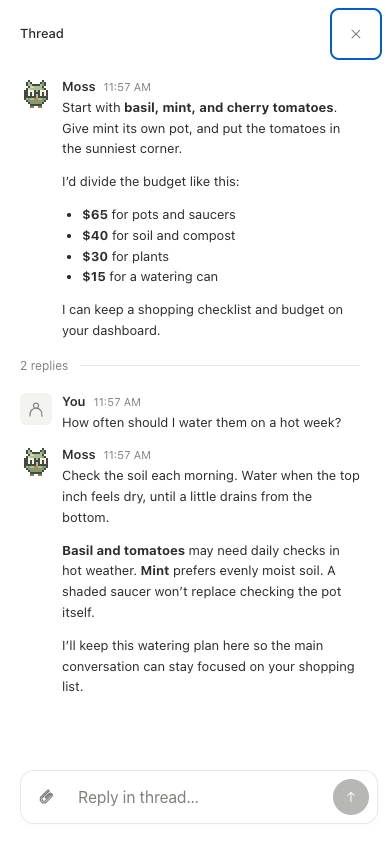
A reply thread opens full screen on mobile; closing it returns to the main conversation. Real Roost interface with fictional sample data. Select the image for full size.
Production builds register a service worker that caches immutable build assets, supports push notifications, and supplies an offline screen when a navigation cannot reach the server. It does not cache conversations, credentials, attachments, HTML pages, or API responses. See startup measurements and notification setup. Updates arrive on the next page load; an active conversation is never automatically reloaded. Roost still requires a connection to its server to send messages or control the computer.
Home-screen icon links use versioned PNGs from Roost's public GitHub repository. iOS may fetch these without the browser's authentication cookie, so serving them behind an authenticated private proxy can produce a blank icon. Only public branding assets use this URL; the app, conversations, and desktop remain authenticated. The SVG favicon and local PNG copies are also included in every release.
After an update, reload the page. If iOS retains an old home-screen icon or launch appearance, remove the shortcut and add it again. Desktop WebKit emulation covers layout checks, but keyboard animation and installed status-bar behavior also need checking on a physical iPhone.
The standalone height workaround follows WebKit bug 254868. If installed before the status-bar metadata was added, iOS may require removing and re-adding the home-screen app; WebKit bug 316008 describes metadata captured at install time that does not update afterward.